Editing your mosaic, brick by brick
The mosaic our software gives you is where you start, not where you have to stop. Every single brick is yours to change, and the tools below exist because of problems real builders kept hitting.
Three pieces in our gallery open the full editor to anyone. Nothing you do there is saved to them — play with every tool, break whatever you like.
Open a gallery piece“The face came out blotchy”
Photographs have noise your eye ignores. Bricks do not: a stray pixel becomes a stray brick, and on skin it reads as a blemish. Pick the Wand, click the blotch to select every brick of that colour nearby, and swap it for the neighbour the editor suggests.
“I do not want to buy eleven colours”
This is the one that saves money, and it is the reason the near colours list exists. Each colour on your list is a separate thing to find and pay shipping for — and the ones with six or eight pieces are the worst deal in the whole build.
Below is a real example: a piece of the Mona Lisa from our gallery, drawn by the same engine that draws your mosaic. On the left as the software made it — 11 colours. On the right after pushing the six rarest into their nearest neighbours — 5 colours, 139 bricks changed out of 676.
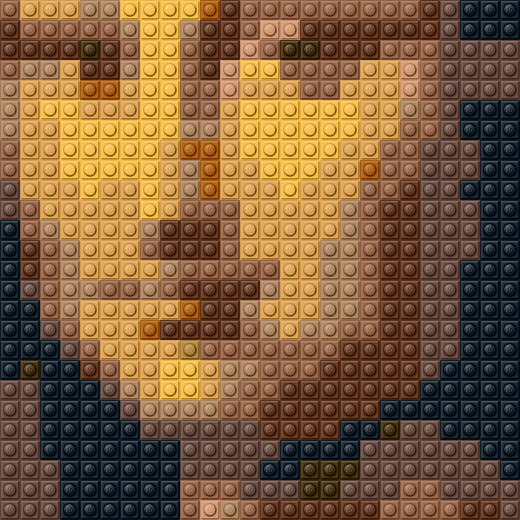 Before — 11 colours
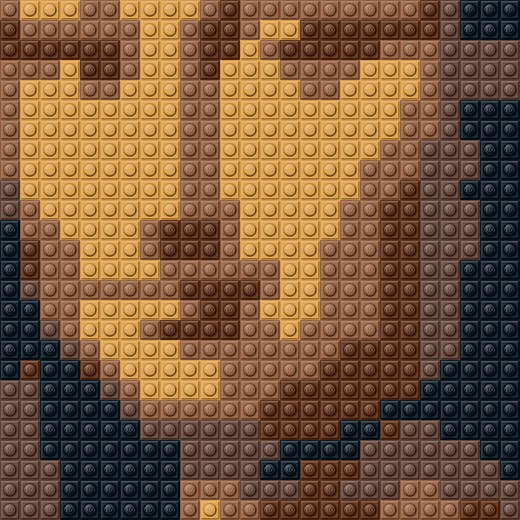 After — 5 colours
And look at what it costs, because it does cost something: the shading on the cheek is flatter. That trade is yours to make, not ours — which is exactly why the tool exists.
“The outline disappeared”
Thin, dark lines — a strand of hair, the edge of a chin, the mast of a boat — are the first thing to dissolve when a photo becomes bricks. The Pencil paints one brick at a time, and three or four bricks in the right place bring an edge back that no automatic setting would have kept.
“The sky has stripes across it”
Banding: a smooth gradient turned into bands with visible steps. Select a band with the Rectangle or the Wand and break it up by swapping part of it to the colour above or below. Scattering a few bricks along the border does more than repainting the whole band.
“I want fewer, bigger pieces”
Your mosaic is not built from 1×1 plates alone — the software merges runs of the same colour into larger plates, which is cheaper to buy and much faster to build. You can pin a piece so it stays exactly as it is, or split an area back into single studs when you want to paint inside it.
On your own mosaic, “Save changes” rebuilds the grid, the piece list and the shopping list on our side — so what you buy is always what you edited. On a gallery piece nothing is saved to it; if you like what you made, you can keep it as a mosaic of your own.